Internet and Email
Europe's Cyber Cafes and WiFi.
How to Use the Internet in Europe. Strange keyboards, new passwords, plugging in your laptop.

The cyber café flurry of ten years ago has settled down and most of those shops are history. But you still see mini offices like this in or near train stations and other places where travelers pass. At this store in Dresden, Germany you can go on line with the house computers, send and read your email, update your blog, surf the web, or play games. Toll charges are posted on the wall. You can also phone or fax around the globe and make copies.
Carpe diem. Vivere bene! Gratia Deo.
Chapter 19 part 3 of
HOW TO EUROPE:
The Complete Travelers Handbook
John Bermont

This entire book is published totally free on-line by the author, photographer, and webmaster, yours truly, with help from my daughter Stephanie. I welcome all questions, comments, compliments, and complaints. For contact information please see NOTE TO READERS. Updated 27 November 2015.

Your Go-To Travel Store
If you ain't on line you ain't alive.
This Internet edition of chapter 19 is divided into four parts because it is so big. The four parts are:
- Telephone Europe: Codes, 10-10, cards, cells, PTT.
- Mail: Air Mail, Priority Mail, PTT, Poste Restante.
- Internet and Email: Europe's Cyber Cafes and WiFi. ⇐ You are here.
- Telegrams: Wiring Cash and Keeping in Touch.
INTERNET AND EMAIL
Communicating via internet email is the easiest and cheapest way of staying in touch. It can also be extremely frustrating getting connected. Some Internet Service Providers (ISPs) require that you register for the service before being granted access to your account from a remote computer. Check with your ISP before flying to Europe. Get a new Internet service provider if yours makes you jump through hoops.
Internet Cafes
Instead of lugging your laptop around you can have internet and email access at "internet cafes" in virtually any city. These places are not as common as they were a few years ago because it seems that nearly everybody in Europe has a computer at home nowadays. But the internet cafes are usually easy to find near train stations, hotels, and hostels where travelers pass. Internet service is free in some coffee shops, bars, and cafes if you buy a drink. In other places it can range up to ten dollars per hour with a minimum one week subscription. Shop around wherever you are! Read and write and surf the web.
Libraries
More and more public libraries throughout Europe provide internet connections. You may need a library card to use the facilities but usually you can just walk in and log on. The beauty of this is that it is almost always free so unless you have an overwhelming need to spend your money at a internet cafe try the library first. Time is normally limited to a half hour or an hour. That's plenty for checking your email and firing off a reply. You don't want to be wasting your Europe time at a keyboard anyway.
European Keyboards
Ah hah! You found an internet cafe or library and signed in. You go to the computer and sit down. You pluck the address bar and go to the URL of your ISP. Now you enter your email address. Oops, no you don't. You can't find the @ key. You rush over to the manager's desk to ask for help but he's busy chatting on his cell phone, and the meter on your computer is running. Finally after ten minutes you get his attention and he shows you where the @ key is located. On the internet finally, it feels like your first cup of coffee in the morning. Moral of story — find out what to do before you start paying. Actually there are a few countries with USA keyboards. Surprisingly, these are among the former communist dominated countries, certainly not Germany or Spain.
Another potential problem is that some keyboards have been used so much that the letters have worn off some of the keys. If you are a two-finger hunt and peck typist this can be an issue. When I went to high school only the girls took typing class so I am one of the two-finger mongrels.
Your Password
Getting on line is a snap, but signing on for your email or financial accounts can sometimes be a problem on a European computer. Make sure that the caps lock is off or your password may not work. Also, if your password includes a Y or a Z you may have problems. For example, in Germany where the qwertz keyboard is used instead of the qwerty keyboard you need to know some pretty deep computech to make it work. As noted above keyboards throughout Europe are often different from the American version, mostly because they have unusual characters in their alphabets. To ease access, change your password to all numeric for the duration of your trip.
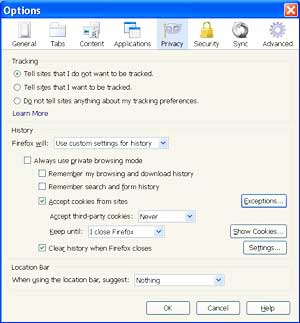
Here is a screen shot of my FireFox internet browser "Privacy" configuration. As you can see I reject third party cookies and automatically trash all cookies when I close my browser. I save no "history" because that just causes trouble. If a web site is upgraded and your history thing remembers it your computer will take you back to the dead version. In that case hit the F5 key to wipe your browser and reload the new version. I have a little white paper taped to my F5 key because I am using it so many times a day.
Security and Signing Off
As you know computer software does a lot of stuff that you don't know anything about. Amongst this is the fact that your browser saves the history of the web sites you visited and it saves cookies. It does this to facilitate accessing those web sites again from your home computer. However, you don't want the next customer at a public computer to know what you've been doing or give them any opportunity to hack your personal stuff. Clean it off before you close the browser.
It is probably not a good idea to be using Internet Explorer anymore because of the security issues. Germany and France banned the use of IE on government computers in January 2010 because communist Chinese hackers had broken into zillions of supposedly secure sites using the Microshaft product. Google has been fighting Chinese censorship and spying for a long time and finally decided to stop doing business in that dictatorship. Unfortunately the Chinese dictators are behaving like Stalin did during the Cold War. Shoot first and change the question later.
Obnoxious Persistent Web Sites
There are some web sites which can lead to war between you and your computer. They lock up your system and literally freeze everything. When this happens on a PC you can not even close the browser. If your mouse is still working scroll to the bottom blue field and right click. A small window opens. Click "Task Manager" and then the tab for "Processes." Another window opens with a bunch of .exe file names. Scroll down to the browser you are using, highlight it, and then click the "end process" radio button. The next time you want to open a web site the browser will come back automatically. In "Task Manager" you can hit the tab for "Applications" and close your browser instead. But when you open the browser again all the junk comes back. So it is better to use "Processes" rather than "Applications."
Sometimes using the Task Manager to rid yourself of a nasty web site does not work. Then you have to reboot the computer.
Sometimes that doesn't work either. Then you have to manually switch off the computer. Computer on-off buttons do not have an ON or an OFF position. They just change from one to the other when pushed, almost. If it is 'on' and you just push the button nothing will happen. You have to hold it in for at least 10 seconds. That should shut down the computer. To start up just push it again.
Sometimes it takes more. If a particularly nasty electron is running around inside your box you might have to pull the plug, literally. Pull the plug on your peripherals also. There might be feedback. If all your stuff is running from one power surge strip this is easy. Just turn off the power strip. Most power strips have a master switch which is illuminated red when it is operating. Flip it off for a couple of minutes and then restart everything. If you are using a laptop pull the battery out in addition to cutting the power.
YOUR LAPTOP
Your Friendly ISP
You are allowed to carry your laptop around Europe, though that is not exactly in tune with the philosophy of packing light, nor is it good for the health and security of your computer unless it is a battlefield model. My little laptop has a solid state hard drive so it is more durable than a high speed disk.
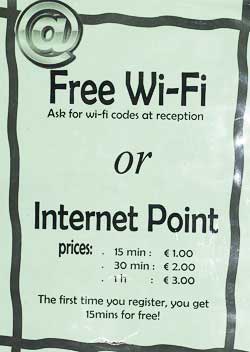
Here are the terms for internet access in the hostel where Stephanie stayed in Florence, Italy. If you have your own equipment with WiFi you can go on line for free. If you need to use the house equipment you pay, about $4.00 per hour. That is not cheap but you would pay more at most hotels just to use the WiFi. I walked nto a hostel in Prague and used their intenet for the same price, and I wasn't staying there. Photo by Stephanie.
Wi-Fi
Modem and dial-up are history. The world of the traveler is going Wi-Fi. Wi-Fi is available in many hotels, hostels, trains, ferries, and other places where travelers are. It is often free, at least for the patrons.
Wi-Fi is the trademark of the Wi-Fi Alliance. According to its website:
In 1999, several industry leaders came together to form a global, non-profit organization with the goal of driving the adoption of a single worldwide-accepted standard for high-speed wireless local area networking.
In practice, if your laptop computer is Wi-Fi enabled you can go on line wherever there is an open Wi-Fi signal. This is known as a "hot spot." You don't need a modem or a cable connection. Many hotels and cafes in Europe are hot spots. They have a trademarked emblem on the window. If you buy a coffee you can use the hot spot, usually for free. I did this daily on my last trip to Paris using my beautiful little laptop computer. My two star hotel had a hotspot also but the darn thing would not work for me. It was probably not Wi-Fi CERTIFIED™ since that hotel is not listed on the official Wi-Fi Alliance web site. On a spring trip around England, Wales, Ireland, and Scotland I brought my netbook and was able to catch free hotspots in a number of places. The Stena Line ferry to Ireland and National Express trains from Edinburgh to London provided free Wi-Fi. This was particularly nice because I could use the dead time to catch up on email. The train even had an electrical outlet so I didn't need to use my netbook battery.
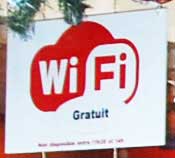
Look for icons like this as seen on a sandwich shop on Boulevard Montparnasse in Paris for free Internet connection. The sign says Gratuit. That means Free, though you might have to buy a coffee, but it won't be as expensive as coffee at the Starbucks down the street. Who in their right mind would go to a Starbucks in France?
There are security issues with Wi-Fi hotspots so it might be best to avoid doing your banking over these systems. Use them to check your email and to browse for hotels, restaurants, museums, and such. On my netbook computer I use the Linux OS and FireFox browser for greater security compared to Windows and Internet Explorer.
On the way home I was stuck at Detroit's airport for a few hours and found a hotspot under one of the airlines' lounges. It came in strong at about 100 feet away. If you travel a lot you might want to subscribe to one of the Wi-Fi services like Boingo.
There are devices that can detect hotspots so you don't need to turn your computer on to find one.
Hardware
European electricy is supplied at 220 volts and 50 Hz. Most laptops sold in the USA are now rated for this voltage and frequency in addition to the American specification which is 110 volts and 60 Hz. To make sure, flip your laptop over and check the manufacturers nameplate or look at the brick on the cord. It must be rated for up to 240 volts and for 50 Hz to use it in Europe.
The plug on your laptop will not fit in standard European electrical outlets. Continental Europeans use a plug with two round prongs, except Britain and Ireland. The Islands have their own plug design. See chapter 11, Electricity in Europe: Travel Voltage Fundamentals, to get up to speed on this subject.
RETURNING TO THE USA
If you bring a laptop computer to Europe you'll probably want to bring it home. The Department of Homeland Security, Customs and Border Protection Service, may want to see what is on your laptop when you arrive back in the good old USA. These folks have the right, and the duty, to see what you are bringing into the country. Their inspection may take a half hour or half of a month looking for bomb ingredients or subway maps. I suggest that you carry back-ups of your working files on a flash drive in case your computer ends up in DHS quarantine. In fact, I don't store anything on my hard drive. I keep all of my files on flash drives and disconnect them whenever I move my computer.
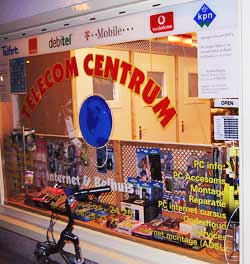
This Telecom Centrum store in Haarlem appears to be the do-all of personal computers and communications. The KPN emblem at the top of the window is the main phone company in the Netherlands. Anything that starts with a K in Holland is Koninklijke, "Royal."
MORE COMMUNICATION INFORMATION
This Internet edition of chapter 19 is divided into four parts because it is so big. The four parts are:
- Telephone Europe: Codes, 10-10, cards, cells, PTT.
- Mail: Air Mail, Priority Mail, PTT, Poste Restante. ⇐ You are here.
- Internet and Email: Europe's Cyber Cafes and WiFi.
- Telegrams: Wiring Cash and Keeping in Touch.
Have a good trip!
NOTE TO READERS
I welcome questions and comments. If you have any concerns about your trip to Europe that have not been covered well enough in this section please do not hesitate to write and ask. When you write please include relevant details, per the folowing paragraphs.
I do not open attachments. I do not click links to web pages of any kind. I will reply in a day or two, usually.
Do not forget to smell the hyacinths. At your liesure scroll through the Table of Contents of How To Europe: The Complete Travelers Handbook and read all 30 chapters, FREE on line. Good deal! You'll probably find the answers you seek, and some you didn't know you needed.
My email address is johnbermont@enjoy-europe.com.
FREE
This web site is totally free for everyone, and a labor of love for me. To keep it afloat I receive a commission from Amazon.com for all goods purchased through the adverts I have selected, and any other products you might buy when you are on the Amazon site. Amazon has almost everything for sale, except the Brooklyn Bridge and Mount Rushmore.
Please visit my on-line store at
 .
Your support is most gratefuly appreciated. TIA.
.
Your support is most gratefuly appreciated. TIA.
To like and like not:


Adverts
To support this site:
Please buy your goods at:Amazon.com
Shop in your shorts!
Please clean out your cookie jar before clicking.
Plug adapters are needed throughout Europe. There are at least five models used in different countries.
Note: The highlighted #E number is purely arbitrary. It is meant to help quickly identify products in this advert column when you write in for electrical advice.
See NOTE TO READERS.
This adapter is for the standard grounded plug in France, Germany, and northern Europe. It does not fit in outlets of Italy, Switzerland, Ireland, and Britain.
#E-010
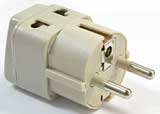 Grounded Universal 2 in 1 Plug Adapter
European Schuko plug.
4.8 mm prongs.
Equivalent to type E and F.
You can use this ungrounded Euro plug in some European countries.
#E-020
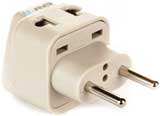 Universal 2 in 1 Plug Adapter
Euro Plug
4.0 mm prongs.
Equivalent to type C.
This is a universal plug adapter for the UK and Ireland.
#E-030
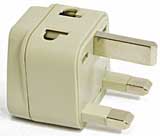 AC Adapter Plug for use in England, Scotland, Wales, and Ireland
Equivalent to type G.
Here is the Swiss version.
#E-040
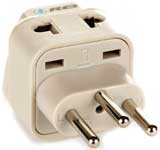 Grounded Universal 2 in 1 Plug Adapter
Type J for Switzerland
Here is the grounded Italian model.
#E-050
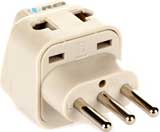 Grounded Universal 2 in 1 Plug Adapter
Type L for Italy
Rolling luggage sure beats lugging a pack on your back.
 Travelpro Luggage Maxlite 2 20" Expandable Spinner
A shoulder bag for your daily walk-about.
 Travelpro Luggage Maxlite3 Soft Tote
Keep your stuff organized.

Luggage Packing Cubes
eBags 3pc Set
Wear a money belt under your shirt to protect your passport and valuables, especially if you are staying in hostels or dorms.
 Lewis N. Clark RFID Blocking Waist Stash
An RFID blocking wallet protects your passport and credit cards from identity theft in public places.
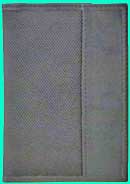 Travelon RFID Blocking Passport Case
A Swiss Army Knife is unquestionably the handiest item a traveler can carry, except not on a plane.
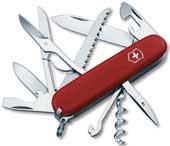 Victorinox Swiss Army Huntsman II Knife
To help find your way on the winding and poorly posted roads of Europe. It works for civilian travelers also.
 Lensatic Military Marching Compass
Inconspicuously lock your zippered luggage with a black wire tie.
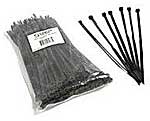 Cables to Go 43036 Cable Ties - 100 Pack (Black)
The links in this pink field take you directly to a page at Amazon.com. The Amazon page details the item, and in most cases includes candid and critical comments from others who have bought the item.
Amazon pays my site a small commission when you click and order an item, if you put it in your shopping cart within 24 hours based on the cookie they set on your computer. If you don't want to make a quick decision just put it in your shopping cart, think it over, and come back later. The revenue covers the cost of maintaing this web site and keeps it free to users.
You benefit when buying here because Amazon has:
- 20% - 30% discount on many items,
- free shipping deals, direct to your door,
- no sales tax on internet purchases in most states,
- zillions of products, well almost,
- fast delivery even when it is free,
- shipment tracking in UPS, USPS, FedEx,
- easy returns if you are not happy with the product.
You win we win. Thanks for your support!!
Have a good trip in life,
John Bermont
Note: Italicized notations by the author.
One of my favorite books. Ernest Hemingway in Paris.
 A Moveable Feast
by Ernest Hemingway